
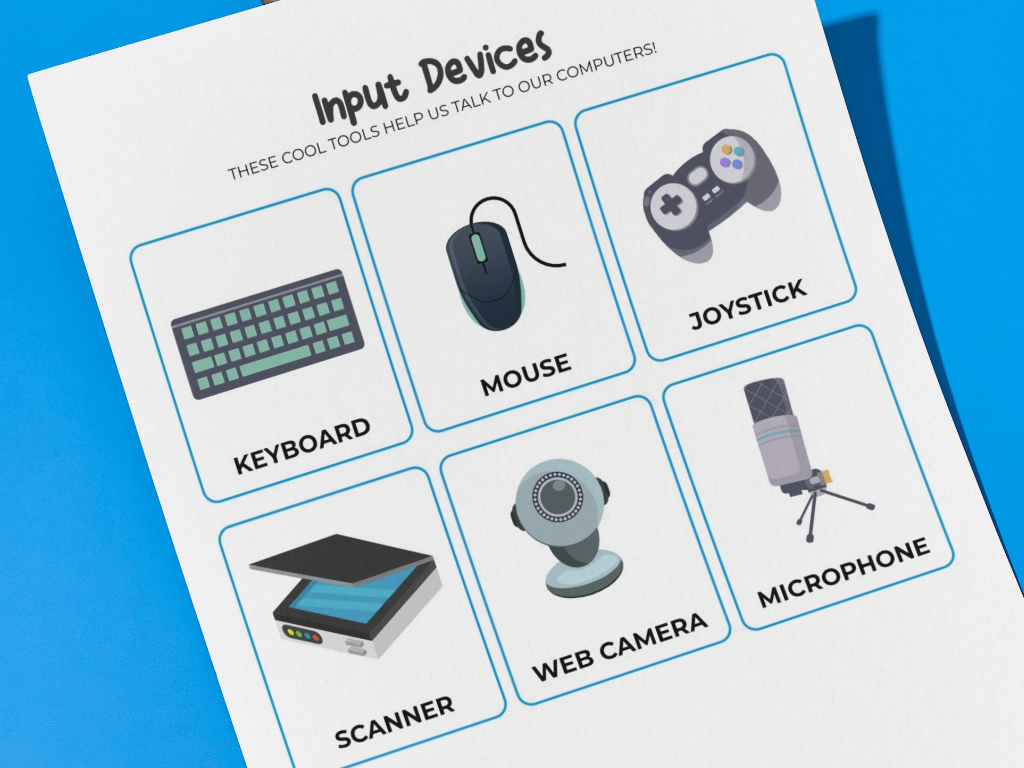
About This Worksheet
These input devices flashcards introduce children to tools that help send information to a computer. The set includes familiar devices such as keyboards, mice, joysticks, scanners, web cameras, and microphones, making it easy for kids to understand how computers receive input.
Designed for early technology learning, these flashcards work well in classrooms, homeschool lessons, or at-home practice. The visual format helps children connect device names with their purpose in a clear and memorable way.
Learning Objectives
- Identify common computer input devices
- Understand how users interact with computers
- Learn basic computer and technology vocabulary
- Build foundational knowledge of computer systems
How to Use This Worksheet
- Download and print the flashcards on paper or cardstock
- Cut out each card for hands-on learning
- Review device names and discuss their uses
- Use the cards for matching, sorting, or review games
Skills Developed
Visual Recognition, Technology Awareness, Vocabulary Building, Memory Skills, Concept Understanding
Quick Info
| Age Group / Grade: | Kindergarten |
| Subject: | Computer Skills |
| Prep Time: | Print & Go |
| File Format: | |
| Download Size: | 46 KB |
| License: | Free for personal/classroom use |

Free Download
High-quality PDF ready for printing




Facebook
X
WhatsApp
Pinterest